
The thank you page is the page every buyer sees — and the page almost no store uses. Here's how to turn that blank "thanks for your order" screen into your easiest extra sale, with no risk to checkout.
A thank you page upsell is a one-click offer shown right after a shopper pays. They can add it to the order they just made — no new form, no second payment. It can't slow or break checkout, because it only runs after the sale is won. Put one relevant, low-cost offer there, give a small reason to say yes, and you turn your most-viewed page into extra revenue. One catch for 2026: you can no longer do this with code — Shopify now wants it done through Checkout Extensibility apps and blocks. This guide covers the what, the why, and the exact steps.
It's an offer a shopper sees in the few seconds after they hit "Pay now."
Because the payment is already done, they can accept it with one tap. No re-typing a card. No second checkout. The new item just gets added to the order they already placed.
That one trick — one click, nothing to re-enter — is the whole magic. It's the lowest-effort "yes" in your entire store.
One quick note on names, because they trip people up:
In plain talk, people mash all of this into "the thank you page." It's just the screen right after someone buys. On Shopify, these offers are built on Checkout Extensibility, which means they run on every plan — not just Plus — and load inside Shopify's own page instead of a clunky redirect.
Here's the part most guides skip — and it matters right now.
For years, stores hacked their thank you page with the Additional Scripts box or checkout.liquid. That door is closing.
The old way is gone. Shopify made the Additional Scripts box view-only on 28 August 2025. Script tags and checkout.liquid on the Thank you and Order status pages are now deprecated.
Deadlines: Plus stores had to move by 28 August 2025. Non-Plus stores have until 26 August 2026 — just a few months away. Automatic upgrades already began in January 2026, and any old script-based customizations get wiped.
What to do: Rebuild your thank you page with Checkout Extensibility — apps, blocks and pixels, not code. See Shopify's official upgrade guide →
Not sure where the new settings even live? Our step-by-step walkthrough on how to customize the Shopify thank you page covers the exact clicks, plus a migration checklist for older stores.
The good news: this actually makes your job easier. A modern post-purchase app drops a one-click upsell onto the page with no code, loads fast inside Shopify's own checkout, and won't break when Shopify updates things. If you've been putting off your thank you page, this is the nudge.
Most pages in your store have to talk a stranger into trusting you. The thank you page doesn't. The hard part is already done. That changes everything.
Here's why it converts when so little else does:
How big is the win? Shopify points to roughly a 10–15% lift in average order value when buyers are shown relevant products after they pay, and post-purchase offers are widely seen as one of the highest-converting moments in all of ecommerce. (Source: Shopify)
One honest note: ignore anyone who promises an exact number for your store. Results swing a lot by product, price, and audience. Treat every benchmark as a rough guide, then test your own offers — your real numbers are the only ones that count.
Picture Sam. She sells coffee gear. Her best seller is a $90 hand grinder.
For a year, her thank you page said one thing: "Thanks for your order!" Nice, but empty.
Then she added one offer on that page: a $14 bag of fresh beans, "20% off — just for this order." Nothing else. One product. One reason to say yes.
People who just bought a grinder want beans. So a chunk of them tapped "add." Sam didn't run a single new ad. She didn't touch checkout. She just stopped leaving her best page blank.
That's the whole idea. The numbers above are made up to keep it simple — but the move is real, and it's about the easiest win in ecommerce.
A great thank you page isn't just an upsell. It's a small, friendly second storefront. Here are the five blocks that earn their spot.
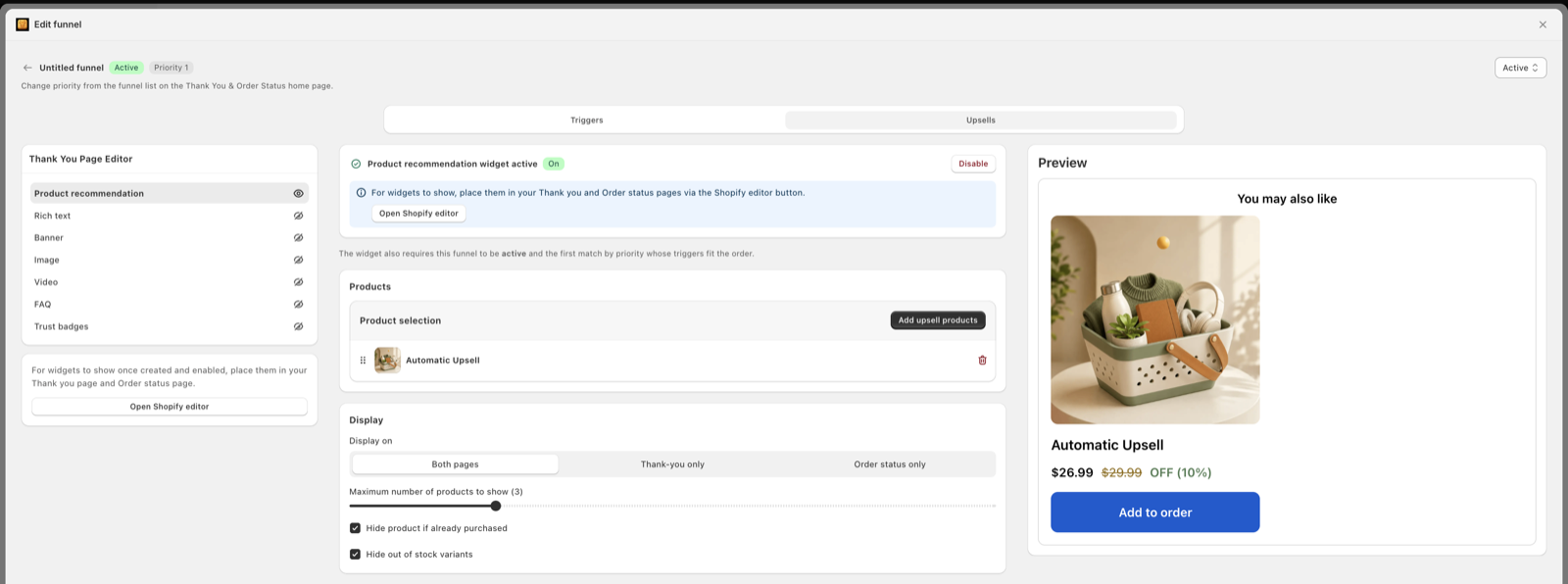
The star of the show. One relevant product the buyer can add with a single tap. This is where the extra revenue comes from.
One quick question. The answers tell you which ads and channels actually work — data that's hard to get anywhere else.
Make it dead simple to buy again or follow the package. Helpful for them, and it quietly sets up the next sale.
"Share with a friend" or "follow us on Instagram." They're at their happiest right now — a perfect time to ask.
Tell them what happens next and say a real thank you. Small touch, big trust. It makes the upsell feel like care, not a grab.
Once the basics work, mix in one or two of these:
You don't need all of it on day one. Start with block 1 — the upsell. Add the rest once it's earning.
No code. Most stores get their first offer live in well under an hour.
Choose one built on Checkout Extensibility. That way the offer runs on any Shopify plan, never touches your checkout speed, and stays safe through the 2026 upgrade. (New to the apps? See our guide to the best post-purchase upsell apps.)
Pick something that goes with what they just bought. A complement, not a copy. Beans after a grinder. Socks after shoes. Filters after a jug.
Add a small push: a one-time discount, a bundle price, or free shipping that only shows on this page. The deal is what turns a "maybe" into a tap.
Say what it is and why it helps, fast. "Add fresh beans — 20% off, only on this page" beats a paragraph every time.
One strong offer beats a wall of them. Shopify's own design guidance says to show no more than three offers in a row and to keep the "decline" button clear. Don't trap people.
Turn it on. Give it real orders. Then change one thing at a time — the product, the discount, or the headline — and keep what wins.
The app just delivers the offer. The offer is what makes or breaks it. These are the angles that win most often:
One rule above all: keep it to one decision. The power of this moment is its simplicity. Don't bury it under three offers, a survey, and a newsletter box at the same time. Lead with the single best offer.
One more thing to plan for, and it is not your fault: some orders never see a one-click offer at all. Shopify skips the post-purchase offer when the buyer paid with a wallet like Apple Pay, Google Pay or Amazon Pay, with a buy-now-pay-later service like Klarna, Affirm or Afterpay, or with cash on delivery. Plain Shop Pay is fine, because it charges a saved credit card. If a big share of your orders come through those blocked methods, pair the thank you page with a cart drawer upsell before checkout, which every shopper sees no matter how they pay.
You can't improve what you don't watch. Keep an eye on four simple numbers:
Then improve it the boring, reliable way: change one thing per test — the product, the price, or the headline — so you know what actually moved the needle. Small wins stack up fast on a page every buyer sees.
Full disclosure: this is our app. We built it because most stores end up paying for three or four tools to cover what one page needs. Oxify puts the whole thank-you-page toolkit — and the rest of your average-order-value stack — in a single app, built on Checkout Extensibility, so it's ready for the 2026 upgrade out of the box.
Prefer to weigh the options first? Read our honest ranking of the best post-purchase upsell apps — competitors included — or see how Oxify compares to Zipify OCU.
It's a one-click offer shown right after a customer pays, on the order confirmation (thank you) page. Because payment is already taken, they can add it to the order they just placed with a single tap — no new form, no second checkout.
Close, but not the same. The thank you page is the confirmation screen right after payment. The order status page is where the buyer checks tracking later. A one-click post-purchase offer appears in the moment right after payment. In everyday talk, people lump it all together as "the thank you page."
No. Shopify made the Additional Scripts box view-only on 28 August 2025, and checkout.liquid and script tags on the Thank you and Order status pages are deprecated. Plus stores had to upgrade by 28 August 2025; non-Plus stores have until 26 August 2026. You now customize these pages with Checkout Extensibility — apps, blocks and pixels — not code.
No. The offer only runs after payment is captured, so it has zero effect on your checkout conversion rate. If the buyer says no, the original order is completely untouched.
No. Thank you page (post-purchase) upsells work on every Shopify plan because they're built on Checkout Extensibility. You only need Plus to edit the checkout page itself or run upsells inside checkout.
It varies by product, offer and audience. Shopify points to roughly a 10–15% lift in average order value when buyers see relevant post-purchase products, and these offers are among the highest-converting moments in ecommerce. Treat benchmarks as rough and test your own offers.
A low-cost product that goes with what they just bought, plus a small reason to say yes — a one-time discount, a bundle, or free shipping. Cheap, relevant add-ons convert best, because the buyer is in an impulse mood and compares the add-on to what they already spent.
Start with one. One strong, relevant offer beats a pile of them. Shopify's own guidance is to show no more than three offers in a row and to keep the "no thanks" option clear and easy.