
A post purchase email vs thank you page upsell is not the same job. The page asks for one tap while the card is still warm. Email asks later, after they have left the store. Use both — in that order — and do not drop a new code on a cart that already got an automatic gift.
This article is for Shopify merchants choosing where to put the next offer after checkout. The thank-you / post-purchase page is for urgency. Shopify can add the product to the same order with one click when the payment qualifies. Email is for delayed consideration — a second product after they have read the receipt, tracked the box, or used the first item. In our experience, post-purchase emails get opened a lot — people check the receipt — but they rarely place another order the same day. That is not a failure. It is a different window. Do not stack an email code on a cart that already unlocked a gift unless you turned combinations on for a reason.
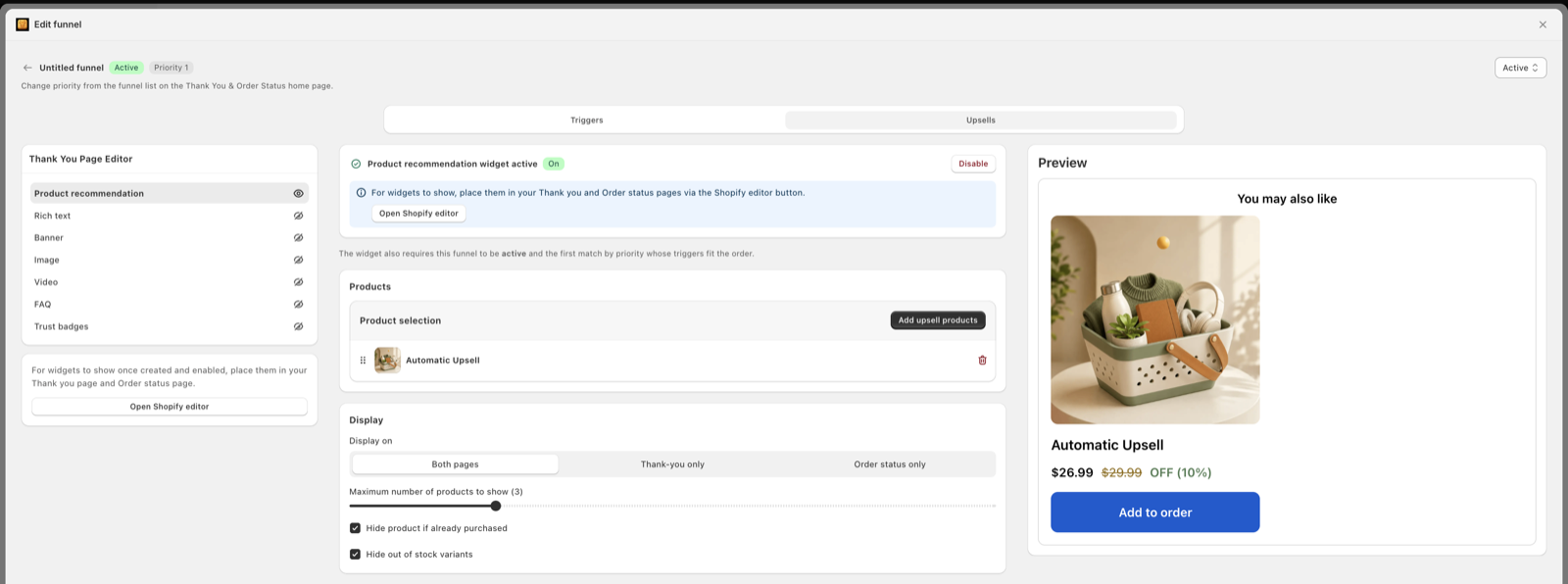
The one-click offer loads after payment, before confirmation. Thank-you blocks load on the confirmation screen. Same visit. Same order, if they tap yes.
A message after the order exists — confirmation, shipping, how-to, or a later offer. They have left checkout. A yes starts a new click path, not the vaulted-card page.
People say “thank you page” for three screens. Shopify splits them. The post-purchase page is the one-click slot. The thank you page is the “order confirmed” screen. The order status page is where they return for tracking. Blocks do not copy from one to the other. See how to customize the Shopify thank you page and how one-click upsells work after checkout.
Email is none of those screens. It is a second channel. Shopify Email can send it from admin. Klaviyo and other ESPs can send it from a placed-order flow. The sequence below works in both. This is not a Klaviyo setup guide.
If you remember one row, remember friction and reach. They pull in opposite directions.
| Lens | Page (one-click + thank you) | |
|---|---|---|
| Immediacy | Seconds after pay | Minutes to days |
| One-click friction | One tap on a vaulted card | Click, load, pay again |
| Reach | Qualifying card / Shop Pay orders | Anyone with an email (and consent for promos) |
| Window | This session, this order | After they leave, often after delivery |
| Personalization | This cart, this SKU | History, tags, replenishment dates |
| Attribution | App + edited original order | UTM on a later order |
“Page” here means Shopify’s post-purchase extension plus thank-you / order-status blocks. Email never replaces the vaulted-card step. Source for the page mechanics: Shopify’s product-offers docs.
On the page, they have not opened Mail. They have not switched apps. Payment just cleared. Shopify’s own flow puts the post-purchase offer before the thank you screen, then the thank you screen, then later visits to order status.
That is a short, hot window. Copy should name the add-on and the reason it belongs with what they just bought. Long stories belong in email.
Email is slower on purpose. Even a “0 minute” flow still waits for Shopify to create the order, the ESP to send, and the inbox to fetch. Many people open the confirmation on the train home. That is fine for a receipt. It is a weak moment for a second checkout.
This is the gap most “email vs page” posts skip.
A native post-purchase offer needs a card Shopify can charge again without a new CVV step. Shopify documents that wallets and installment services skip the page — Apple Pay, Google Pay, Amazon Pay, Klarna, Affirm, Afterpay, and gift-card or non-card checkouts. Regular Shop Pay still works because it charges a saved card. Read Shopify’s product-offers limits.
Email has no such API. A “one-click” button in Klaviyo or Shopify Email is a link. It opens a product, a cart with a discount, or checkout. Shop Pay can speed that second payment. It is still a new order, not an edit to the first one.
So: page = add to this order. Email = start another order. That is why the page is the urgency tool and email is the later-consideration tool.
Shopify also lets a buyer accept at most three post-purchase offers per checkout. One strong offer usually beats a chain. Details in single vs multiple post-purchase offers.
The page is picky. Email is broad.
If half your orders are Apple Pay on phones, half your buyers will never see the one-click offer. They will still see thank-you page blocks (those are not the vaulted-card page) and they will still get a confirmation email. That is why you run both surfaces. The page is not “broken.” Shopify skipped it on purpose.
Cash on delivery never qualifies for the one-click page. If that is most of your mix, put effort in blocks and email, and read COD post-purchase upsells.
Email reach has its own gate: consent. A transactional confirmation can go to the checkout email. A promotional upsell in that same send can trip the “primary purpose” test in the U.S. FTC CAN-SPAM guide. If the message is mostly a sale, treat it as marketing: unsubscribe, physical address, and a marketing-opt-in where Shopify or your ESP requires it. Shopify’s own notes on Shopify Email sit in Marketing. Keep the receipt as a receipt.
Thank-you blocks still show after Apple Pay. The one-click post-purchase page does not. If your only offer lives in Settings → Checkout → Post-purchase page, wallet buyers get nothing extra except the default confirmation. Put a simple block on Thank you for them, and save the hard sell for email after delivery.
The page window is this checkout. Shopify even holds fulfillment while the post-purchase flow runs, then releases the hold when they hit order status or after about an hour if they bounce. That hold is documented in the same product-offers guide. Do not build a five-minute quiz on that screen.
The email window is days to weeks. Post-purchase emails typically open very well — people want to check the order — but they place far fewer same-cycle orders than an abandoned-cart flow does. People open. They do not buy again right away. Apple’s Mail Privacy Protection also prefetches images, so opens can look higher than real human opens. Use clicks and later orders, not open rate, when you judge an upsell email.
That is the sequence in one line: page captures urgency; email handles delayed consideration.
Need timing beyond this split? See when to show a post-purchase upsell.
The page knows this cart. That is enough: case for the phone, refill for the serum, extra bag of food. Rules by product, cart total, country, and customer tag are the right tools here. Oxify lists those triggers on the homepage, with AI as an option on top — see manual vs AI recommendations before you turn ranking on.
Email knows more, if you let it. Past orders. A “has already accepted post-purchase add-on” tag. A first-time vs returning split. Replenishment by SKU. Use that later, not in the confirmation. Pair it with first-time vs returning offers and how to personalize post-purchase upsells.
A good rule: if the page already sold the add-on, suppress that SKU in email for 30 days. If they declined the page, email can try a smaller, later item — not the same headline an hour later.
Page revenue sits on the original order as an edit. Your upsell app should show offers shown, accepted, and extra AOV. That is the cleanest number.
Email revenue sits on a later order with UTM parameters. If you also fire the same product in a thank-you block, pick one owner per SKU per buyer.
Shopify warns that some third-party pixels using the Pixel API report only the first purchase, and scripts that fire only on order status miss the post-purchase add. Ads dashboards can look “low” while the order in admin is higher. Plan for that. Shopify’s note is in the same limitations table.
Practical split:
For a fuller tracking setup, see how to track post-purchase upsell revenue.
This is the expensive mistake.
The cart already hit a free-gift threshold, a BOGO, or a volume break. Then the confirmation email drops SAVE15. Then they apply it on the next visit — or, worse, you taught them to wait for a code every time.
Shopify is clear on two related points. Admin-created discounts are not compatible with the post-purchase page. And combinations only apply when each discount allows it. Automatic gifts from an app are not the same object as an admin code, but the margin math is the same: two deals on one buyer is a choice, not a default.
gift-unlocked or ppu-accepted from promo flows unless you meant to combine.If you truly want a second deal, make it a different product at a small dollar off, after delivery, with combinations checked. Discount strategy detail lives in post-purchase discount strategy.
Urgency on the page. Consideration in the inbox. One owner per offer.
Settings → Checkout → Post-purchase page. One app. One product that belongs with the cart. No extra sitewide code on this screen. Shopify admin discounts will not apply here anyway.
Checkout and accounts editor → Thank you. A simple complementary block or a “what happens next” note. This is what Apple Pay customers still see. More on blocks in thank you page upsells.
Order number, items, address, tracking when you have it. No SAVE15. No “wait, one more deal.” If you use Shopify Email or Klaviyo for this, keep the primary purpose transactional.
How to use the product. When it should arrive. A link to order status. Save the sell until they can picture the first item in hand.
After delivery — or after the first tracking event if your product is digital. Complementary item. Exclude ppu-accepted and gift-unlocked unless combinations are on and you still have margin. First-time vs returning copy can split here.
A skincare shop runs a $15 gift at $60 in the cart drawer. The one-click page then offers a travel-size SPF. The confirmation email used to include 15% off the next order.
Margin on the $60 cart was already thin after the gift. The 15% taught buyers to wait. They turned the code off for anyone tagged gift-unlocked, left the SPF on the page, and moved a moisturizer refill email to day 12 after delivery. Same tools. Different order.
Full disclosure: this is our app. Email still lives in Shopify Email or Klaviyo. Oxify is for the cart, the gift engine, the one-click post-purchase page, and thank-you blocks — so the “urgency” half of this sequence is not four separate tools.
Listing facts checked 22 August 2026. Comparing tools? Read the best post-purchase upsell apps or Oxify vs ReConvert if you already live in thank-you-page funnels.
For a fast yes, the page wins. Shopify can add the item to the same order with one tap when the payment qualifies. Email reaches more people, including Apple Pay buyers, but they must click, load a page, and pay again. Use the page for urgency and email for a later, calmer offer.
No. A Shopify post-purchase extension can reuse the vaulted card on qualifying checkouts. An email can only send someone to a product, cart, or checkout. Shop Pay can make that second checkout faster, but it is still a new payment, not the native post-purchase page.
Usually no. The confirmation is a receipt. If the cart already received an automatic gift, BOGO, or volume break, a fresh 10–15% code stacks margin you already spent. Shopify also states discounts created in the admin are not compatible with the post-purchase page itself.
Because most people open the confirmation to check the order, not to shop again. Apple Mail Privacy Protection also inflates open rates by prefetching images. Judge an upsell email on clicks and later repeat purchases, not on the same-day add-on.
Shopify skips the post-purchase page for wallets and installments such as Apple Pay, Google Pay, Amazon Pay, Klarna, Affirm, and Afterpay, plus gift cards, duties, multi-currency, local delivery, and some other cases. Those buyers still get the confirmation email and thank-you page blocks.
Count page adds from your upsell app and from Shopify’s edited order. Count email from UTMs on a later order. Do not credit both for the same add-on. Shopify notes that some third-party pixels only see the first checkout, so the page add-on can be missing from ads reports.
No. Both can send a placed-order message and a later campaign. Klaviyo has more filters. Shopify Email lives in admin. The rule is the same: page for the one-click moment, email after they have had time to think, and never a stacked code on a gifted cart unless combinations are set on purpose.
Do not compete with the page in the first hour. Keep the confirmation as a receipt. A complementary offer fits better after the shipping email, or after delivery, when they can picture using the first product. Replenishment belongs on the product’s use-up window, not on day zero.
Set one matching one-click offer today. Strip the percentage code out of the confirmation. Move the next SKU to after delivery. That is the whole comparison, in practice.