
Post-purchase upsell order value targeting is not three random dollar amounts copied from another store. It is three bands on your average order value, then a second check: how much margin is left after gifts and discounts. Cheap add-on. Mid bundle. VIP premium. One offer on the screen.
To target a post-purchase upsell by order value, set three cart-value bands in your upsell app's display rules, then assign one offer per band. Low carts get a cheap add-on, mid carts a small bundle, VIP carts a premium accessory. Size the bands on your own AOV, and check leftover margin before you call a cart VIP. Use the last 90 days of AOV from Shopify Analytics as the ruler. A working sketch: low under about 0.7× AOV gets a cheap add-on; mid from 0.7× to 1.5× gets a small bundle; VIP above about 1.5× gets a premium accessory or service. If the cart already ate a gift or a deep automatic discount, drop a band. Then split first-time vs returning inside the band — that second layer is in first-time vs returning post-purchase offers.
A $9 pouch on a $220 cart looks like an afterthought. A $49 kit on a $32 cart looks like a second checkout. Both can be “relevant.” Both can still be the wrong size.
Order value targeting is the size check. Product matching is the fit check. Do fit first if the catalog is dangerous (sizes, voltage). Then size the offer. AI ranking does not replace this — manual vs AI recommendations.
Shopify’s post-purchase UX guide still wants one clear yes or no, relevant products, and no more than three consecutive offers. Bands are how you pick which one product. They are not an excuse to show a shelf. Read the UX notes.
Open Analytics in Shopify. Note average order value for the last 90 days. If you run huge sale weeks, also note AOV with those weeks removed. You will use that number as “1.0×.”
A worked sketch — not a result from a real store, only arithmetic. Suppose 90-day AOV is $80:
If most of your orders clump at $79 because of a free-shipping threshold, your “low” and “mid” will sit on either side of that line. Put the cut just under the threshold so the gift-unlocked carts are not treated as VIP.
Put your own AOV in the AOV calculator if you want a revenue sketch. Do not copy another brand’s $50 / $100 / $200 cuts unless their AOV matches yours.
Shopify also needs the original order to be at least $0.50 before a post-purchase offer can show at all. That floor is in the product-offers limitations. It almost never hits a real cart, but $0 samples and 100% off tests will skip the page.
Subtotal lies during promotions.
A mid cart that already received an automatic gift has spent some of the “room” you thought you had. A VIP subtotal with 40% off and free shipping can be thinner than a small full-price order. If you only filter on “cart > $100,” you will treat the discounted cart as rich.
Operator check before you assign a band:
If two of those are ugly, drop one band: VIP becomes mid, mid becomes the cheap add-on, low becomes “thank you note only.” Shopify admin discounts are not compatible with the post-purchase page anyway, so do not plan on stacking an admin code on that screen. App-level offer prices are their own thing — still count the gift on the original cart. Profit math: calculate post-purchase upsell profit.
Lots of carts sit $1 under or $1 over free shipping. That is a pre-purchase job for the cart drawer, not a reason to show a $40 post-purchase bundle. After payment, the shipping decision is done. Offer something that is worth adding to this shipment, not a new threshold game.
Cheap add-on. Mid bundle. VIP premium. Frameworks only — your SKUs, your AOV.
Under about 0.7× AOV, after you check margin. One small complementary item. Usually 20–35% of the cart, not another hero.
Goal: an easy yes that still covers the extra pick-and-pack
About 0.7× to 1.5× AOV. A two-piece kit or “complete it” pair they almost built. Still one tap, one price.
Goal: raise AOV without a second hero decision
Above about 1.5× AOV, and only if margin is still healthy. Care kit, upgrade, protection, white-glove add-on that ships with the order.
Goal: respect the spend; do not nickel-and-dime
They already decided this would be a small order. Do not argue with that on the confirmation screen.
Good shapes:
Skip: a second full-size hero, a “VIP only” service, a 20% code on top of a gift they already unlocked. Email can try a calmer offer later — page vs email.
Price sketch, not a promise: keep the add-on under about a third of the cart so it still feels like a tap, not a new checkout. High-ticket stores should still size off AOV, not off a $9 internet default. See best products to offer as post-purchase upsells.
This band already looks like your typical buyer. They can absorb a “finish the set” price.
Good shapes:
A kit is one SKU on the post-purchase page. The buyer sees one line, one price. If the kit would look odd next to what is already in the order, sell the missing piece as a single add-on instead. Thank-you blocks can carry the same offer for buyers who skip the one-click page — see thank you page customization.
Keep the headline about the job (“the strap so you can actually carry it”), not about the band name. Nobody wants to be told they are “mid.”
They just spent like a top customer. Showing a $6 sticker trains the wrong lesson.
Good shapes:
Skip: a discount code “as a thank you.” They already paid. A code teaches them to wait. Skip also a cheaper version of the same product — that is a regret offer, not a VIP offer. High-ticket notes: post-purchase upsells for high-ticket products.
If VIP volume is tiny, you still run the rule. You do not need a case study. You need the expensive carts to stop seeing the $9 pouch.
Value first. Relationship second. If you only split new vs returning, a returning buyer with a $30 cart still sees the VIP kit.
Examples of the second split (frameworks, not results):
Full write-up: post-purchase upsells for first-time vs returning customers. Personalization rules in general: personalize post-purchase upsells.
| First-time | Returning | |
|---|---|---|
| Low | Tiny complementary + clarity | Refill if due, else same tiny add-on |
| Mid | Complete-the-set kit | The piece they did not buy last time |
| VIP | Care / protection | Skipped accessory or limited SKU |
Six cells is the map. You can launch three (value only) and add the returning column in month two.
Order value targeting still sits inside Shopify’s slot:
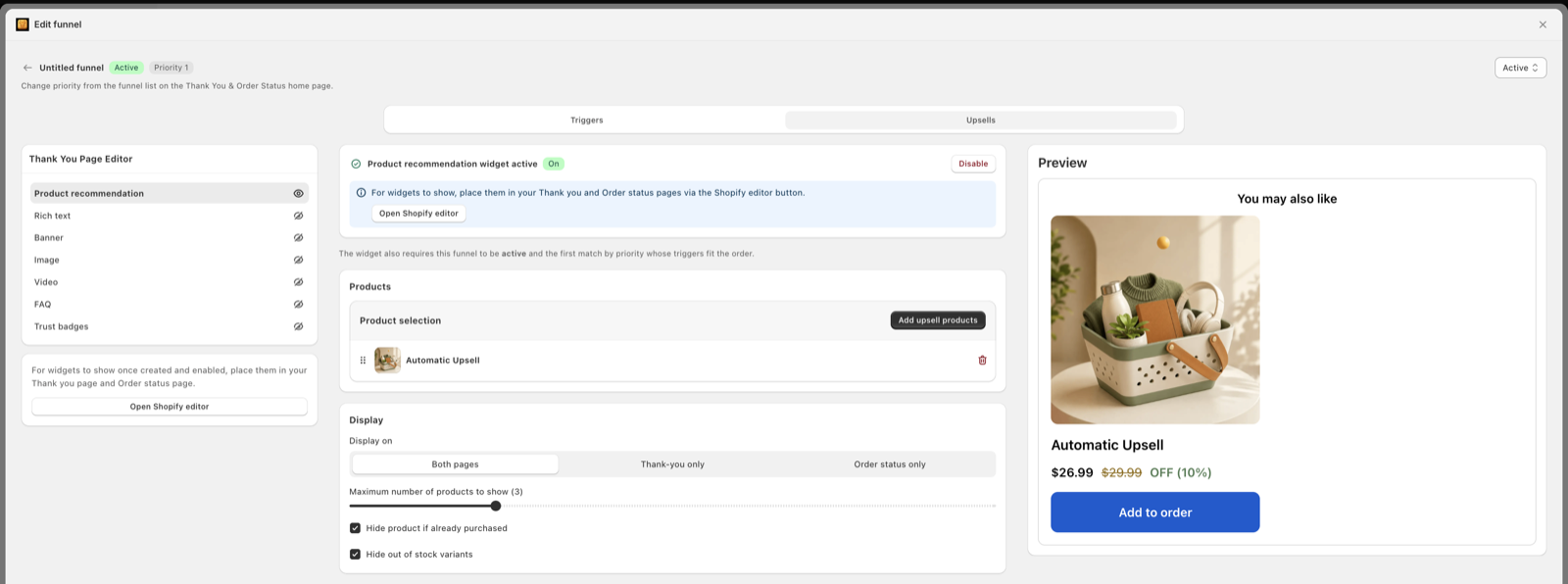
Oxify lists order-value display rules next to customer, cart, country, and product. Use them as the band engine. Do not turn on a whole-catalog AI pick and hope it respects VIP taste — fence the SKUs per band. That is the hybrid in the AI article.
Every major post-purchase app has some version of this switch. The names differ. The logic is the same.
Tip from our own setup work: name the rules by band and SKU (“VIP · care kit”), not by date. You will read them again in three months.
90-day AOV. 0.7× and 1.5×. Note the free-shipping threshold and the gift threshold so you do not treat gift-unlocked carts as VIP.
Not five. Launch with three offers total. Compatibility first. Write the offer with a three-second yes.
Cart / order value ranges, plus “exclude if gift already added” if your gift engine can tag that. Country and product filters as needed.
Wallet buyers never see the one-click page. Same three SKUs, same cuts, in the editor. Thank you page upsells.
One order in each band. Confirm the matching SKU. Refund. Then one Apple Pay order to see the block path.
If your gift engine fires at $50, test $49 and $51 on purpose. That is where bands and gifts collide.
Full disclosure: this is our app. It has display rules by customer, cart, country, product, or order value. That is the band switch. Gifts and volume discounts live in the same app, which is why you can tag a gifted cart and drop it out of VIP. We are not claiming a case-study lift from three bands.
Listing checked 22 August 2026. Next: first-time vs returning or Black Friday post-purchase strategy when sale week will scramble your AOV.
Use your last 90-day average order value as the ruler. Set three bands (about under 0.7×, 0.7–1.5×, and over 1.5×). Then check remaining margin after gifts and discounts. Low carts get a cheap add-on, mid carts a small bundle, VIP carts a premium accessory or service. One offer per screen.
Percentages of your own AOV. A $40 cart is VIP for a $12 sticker shop and low for a $180 furniture shop. Shopify reports AOV in Analytics. Recheck the bands after a sale week, because sitewide discounts move the mix.
A $120 cart with a free gift and 30% off can have less cash left than a $55 full-price cart. If you only target on subtotal, you will give VIP treatment to the thinnest orders. Subtract automatic gifts and stacked discounts before you pick the band.
A cheap, relevant add-on that still has margin after shipping on the extra line. Think under about 25–35% of the cart, and usually a consumable or small accessory — not another hero product. Skip a new percentage code if they already unlocked a gift.
A premium accessory, care kit, extended coverage if you sell it honestly, or a service that ships with the order. Do not upsell a cheaper version of what they just bought. Do not dump a 20% code on a cart that already paid full VIP prices.
Value is the first split. New vs returning is the second. A first-time mid cart may need a simple complementary item. A returning VIP cart can see a refill or a higher tier they skipped last time. Keep both rules; do not collapse them into one messy tag.
The one-click post-purchase page skips Apple Pay, Google Pay, Klarna and similar methods. Thank-you page blocks can still use order-value rules for everyone. Put the banded offer in both places, or wallet buyers only see the default confirmation.
After a 90-day look, then again after a big sale or a price change. Do not retune every week or you cannot tell if the offer or the band moved the number. Use the profit calculator before you raise VIP prices.
No. Post-purchase upsell apps from the Shopify App Store work on every plan, Basic and up. Only custom-coded post-purchase extensions are limited to Plus. The order-value rule is an app feature, not a plan feature.
Write 0.7× and 1.5× on a sticky note. Pick three SKUs. Drop a band when a gift already fired. That is order-value targeting.